
Give clients a real choice
Build multiple priced options, dated itinerary items and selectable extras. Review the details and deposit wording before sharing the proposal.
Product / Proposals to bookings
Present trip options, share a private proposal and keep the client’s selection connected to the booking, deposit schedule and draft itinerary.
One month free with FOUNDING20. No card required.
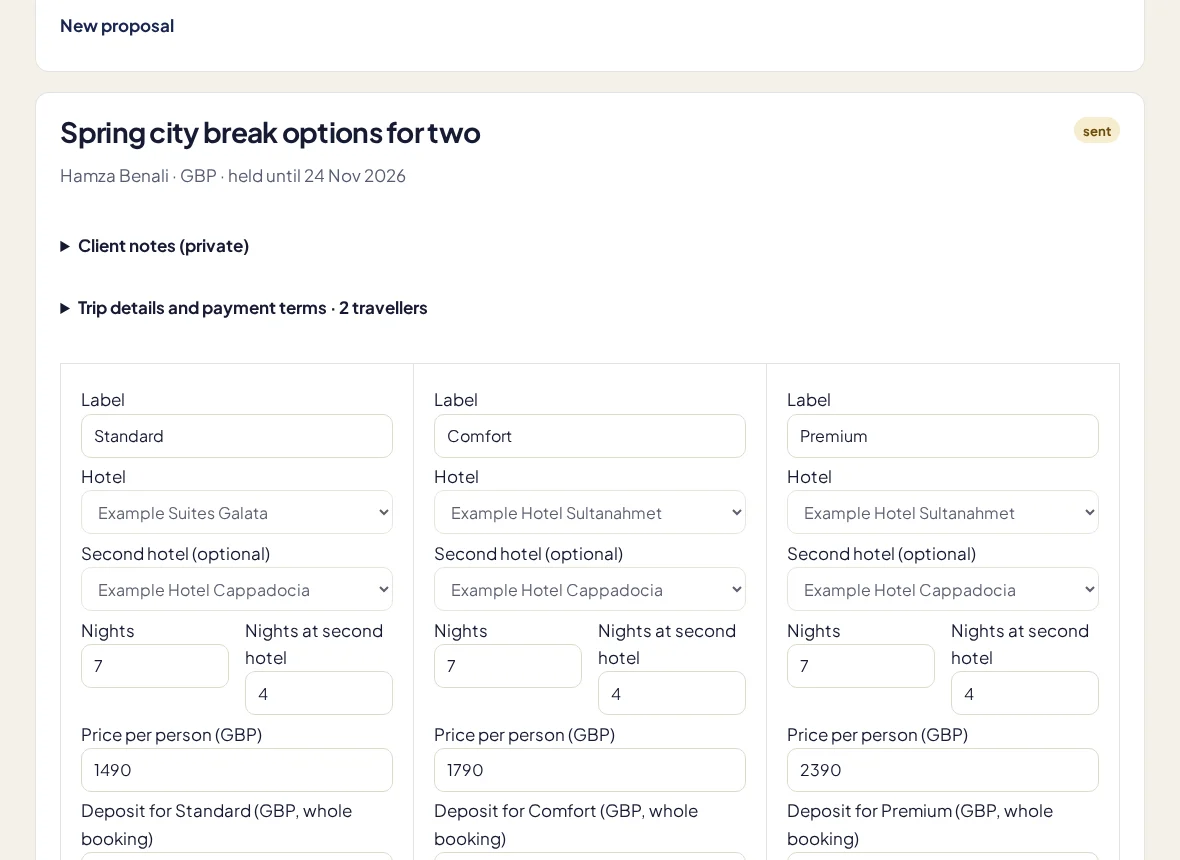
Build multiple priced options, dated itinerary items and selectable extras. Review the details and deposit wording before sharing the proposal.
The client chooses an option and approves with a typed name. Lifecycle history keeps proposal progress separate from supplier confirmation.
An accepted proposal creates booking line items, a manual deposit schedule and a draft itinerary. Review the result instead of starting again in a blank record.
In the working day
A proposal is the beginning of a travel booking, not the end of the work. TripClerk carries the selected option forward so the agreed price and the operational record stay connected. You can then work through the trip checklist, check the payment dates and build out the itinerary. The client’s approval is recorded; it does not place reservations, collect money or confirm availability with a supplier.
Supplier reservations, card checkout, AI quote extraction and complex multi-room pricing are not included. Always check availability and supplier terms before treating a trip as confirmed.
More about the current limits →No. TripClerk records approval and drafts the booking and schedule. Payments are recorded manually.
No. Review the draft and explicitly publish the client-facing itinerary snapshot when it is ready.
Keep a client’s details, stage and last conversation beside the work that comes next. A visual pipeline helps the whole agency see which enquiries need attention.
Arrange flights, stays, transfers and activities in a day-by-day itinerary. Work privately, preview the details, then publish the version you want your clients to see.
Let clients check their trip, itinerary, balance and documents in a private portal, with a conversation tied to the booking or traveller it belongs to.
Your next trip starts here
Try a real booking in TripClerk. One month free with FOUNDING20, no card and no automatic charge.
Have a question first? Talk to us →