
Build around the travel day
Use dated segments and clear descriptions to put the schedule in order. Add photos where they help explain the experience.
Product / Itinerary builder
Arrange flights, stays, transfers and activities in a day-by-day itinerary. Work privately, preview the details, then publish the version you want your clients to see.
One month free with FOUNDING20. No card required.
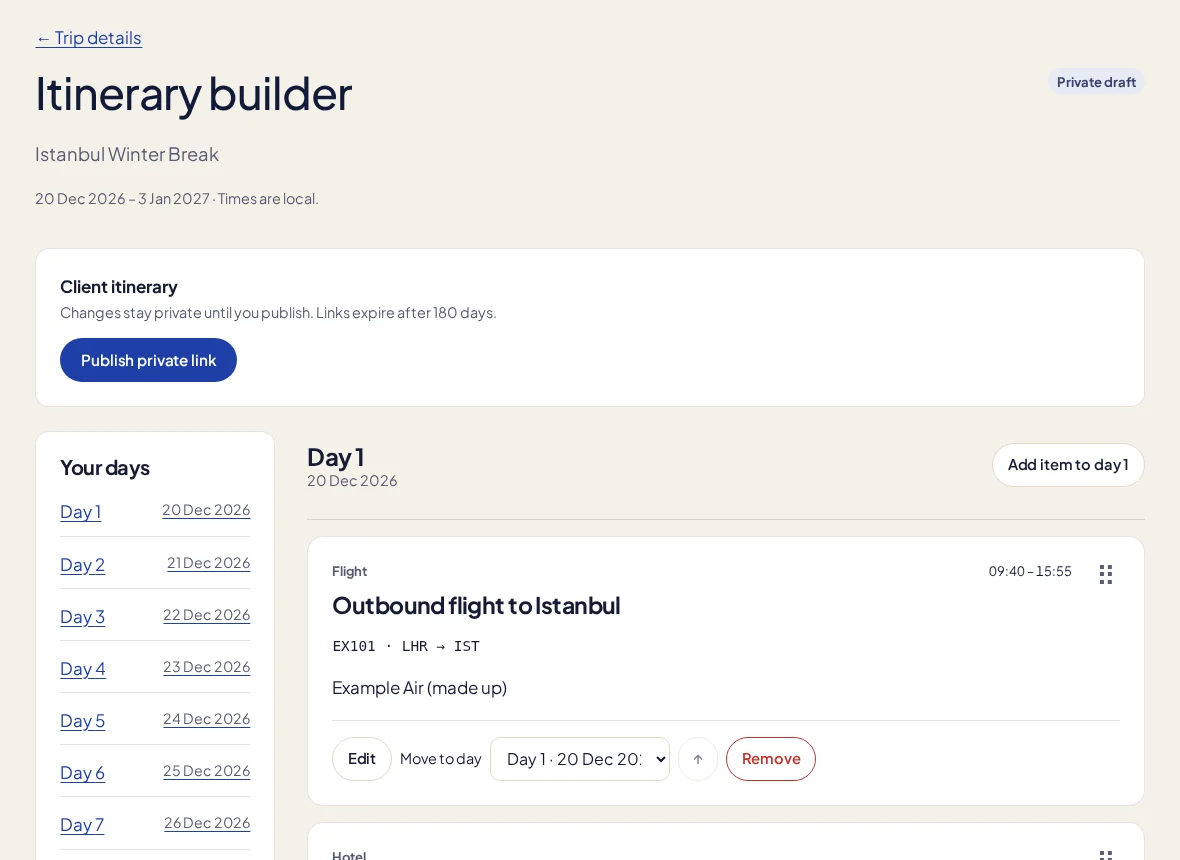
Use dated segments and clear descriptions to put the schedule in order. Add photos where they help explain the experience.
Start from reusable itinerary content and templates. Keep the useful structure of a familiar trip without copying an old client’s private details.
Share a private published snapshot. Keep editing the working version without silently changing the client’s plan; publish again when the update is checked.
In the working day
A clear itinerary tells a traveller what happens next without making them hunt through supplier emails. The builder lives beside the trip record, with reusable content to reduce repeated typing. Client questions and tasks can stay tied to that trip. Restoring an earlier version helps you recover working content, while deliberate publication keeps your drafting process separate from the version a traveller is relying on.
No AI-generated itinerary, live flight monitoring or automatic supplier-content feed is connected. Changes to trip dates do not silently move itinerary segments or republish the client copy.
More about the current limits →Yes. Published itineraries use a mobile-friendly private page.
No. The client sees the published snapshot until you explicitly publish a checked update.
Keep a client’s details, stage and last conversation beside the work that comes next. A visual pipeline helps the whole agency see which enquiries need attention.
Present trip options, share a private proposal and keep the client’s selection connected to the booking, deposit schedule and draft itinerary.
Let clients check their trip, itinerary, balance and documents in a private portal, with a conversation tied to the booking or traveller it belongs to.
Your next trip starts here
Try a real booking in TripClerk. One month free with FOUNDING20, no card and no automatic charge.
Have a question first? Talk to us →